Mistral Vibe OpenDesign

Design With
Mistral Vibe in
OpenDesign.

How to design interfaces with Mistral Vibe CLI in OpenDesign: a Devstral model running locally or on your key, one product-page task from brief to reviewed file, and the limits to know before you start.

From brief to interface01 / Mistral Vibe
YOU BRING THE IDEA

“A storefront page from
an open model, run locally.”

Illustrative interface · not a captured product session
On This Page Example
  1. Example
  2. Fit
  3. Compatibility
  4. Setup
  5. Workflow
  6. Resources
  7. Limitations
  8. FAQ

One Complete Mistral Vibe Design Task

A Mistral Vibe Design Task, From Brief to Interface

A single task, shown end to end: the brief and constraints you hand over, the artifact that comes back, and the checks you still run before it is done. The interface below is an illustrative example built for this page, not a recorded Mistral Vibe run.

1Design Brief and Constraints

Brief

Design a product page for a ceramics studio shop: large photo, price, quantity and glaze options, add to cart, and three related pieces. Local model, local files. Desktop and phone.

  • Design systemOpenDesign paper canvas: Albert Sans, one green accent
  • Breakpoints1440px desktop and 390px mobile, no horizontal scroll
  • InteractionsGallery, glaze selection, quantity, add to cart
  • OutputOne self-contained HTML file with stable data-od-id hooks

2Division of Work: You, Mistral Vibe and OpenDesign

  • You

    Write the brief, select the design system and define the acceptance criteria.

  • Mistral Vibe

    Plans the layout, writes the HTML, CSS and JavaScript and revises it on request.

  • OpenDesign

    Provides the design system and skill, renders the preview and stores every version as a file in the project.

  • Review

    Visual hierarchy, spacing on the 8px grid, both breakpoints and every interaction are checked before handoff.
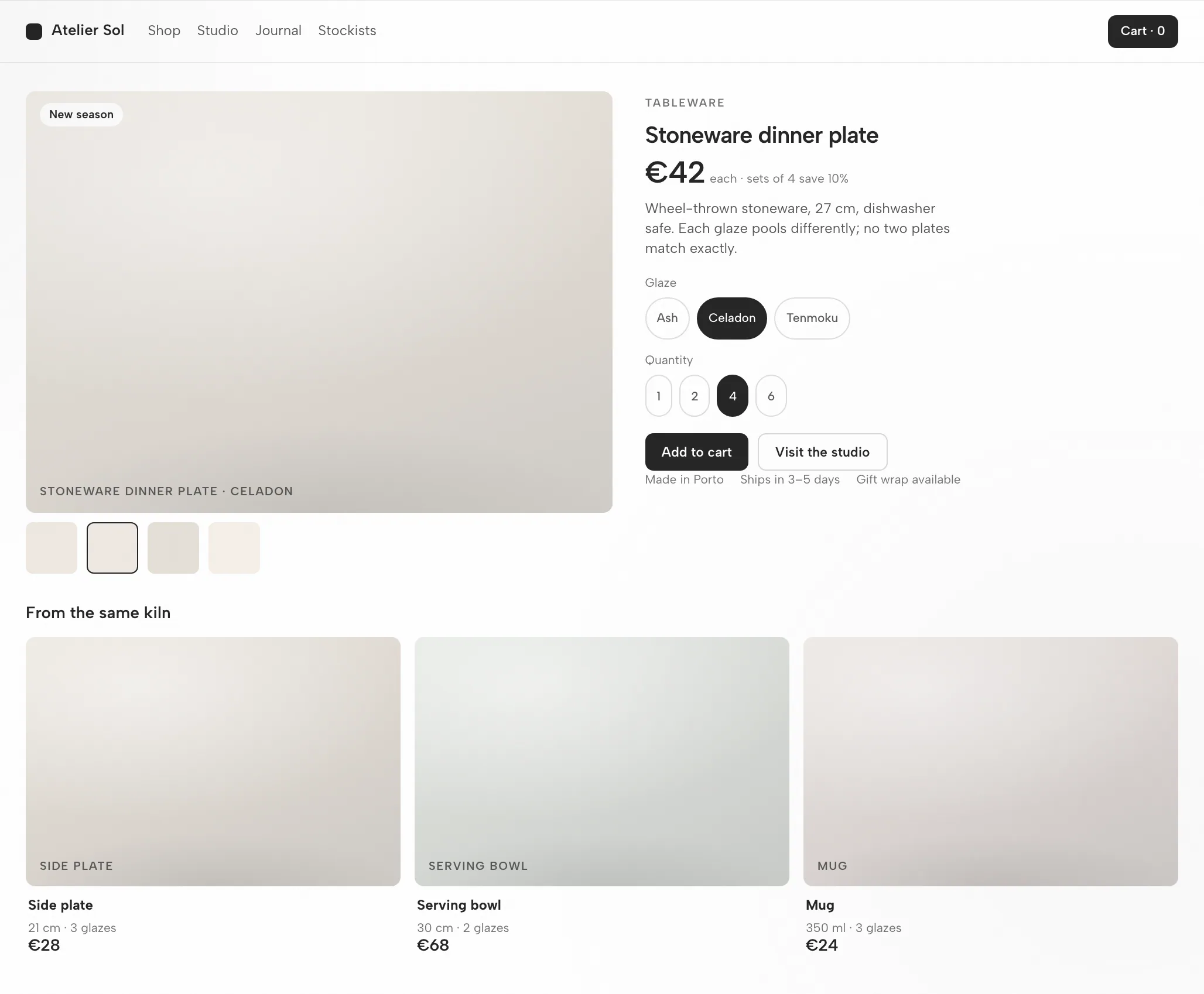
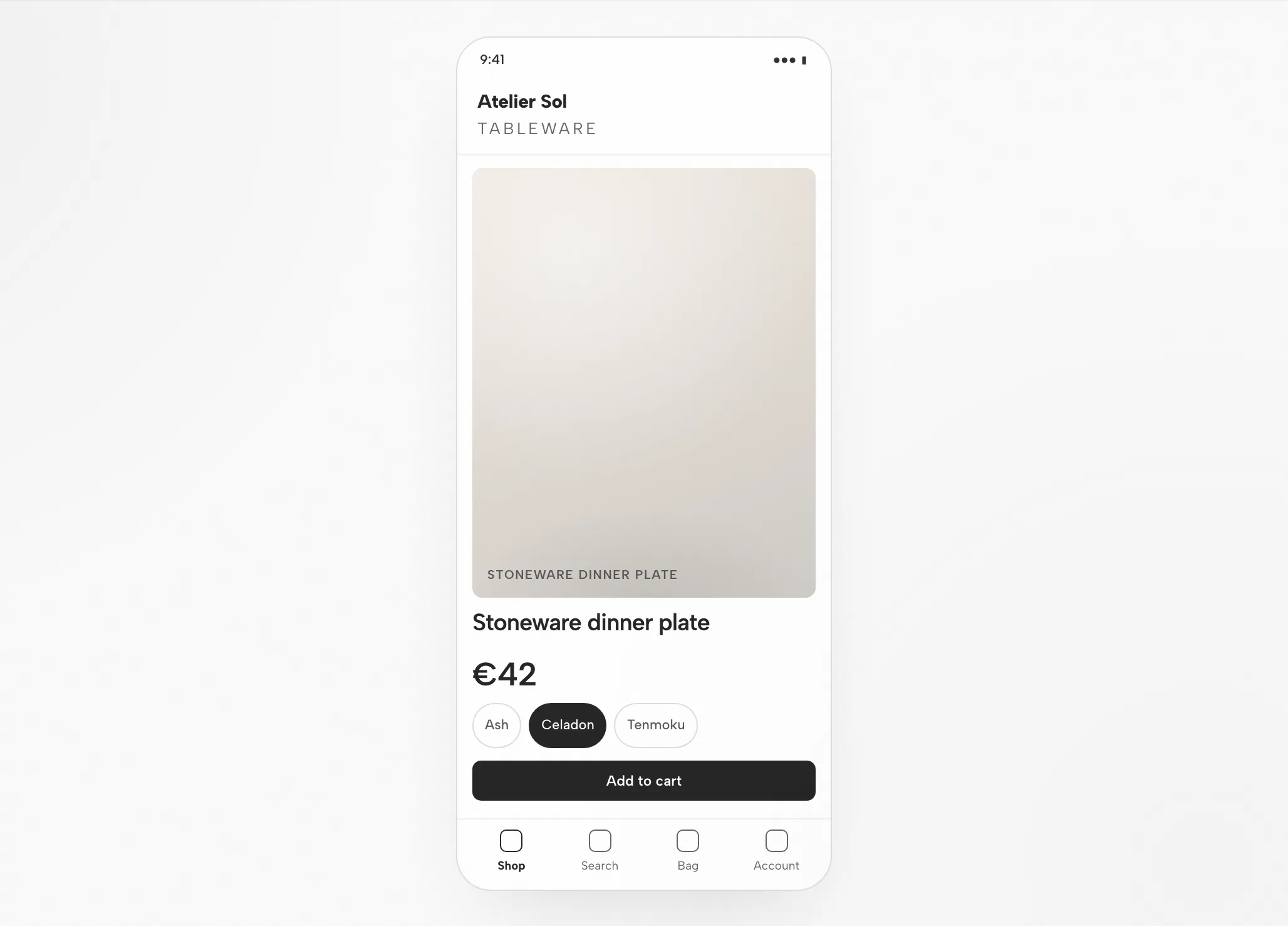
3Mistral Vibe Artifact: The Storefront Page at 1440px and 390px

Mistral Vibe Artifact: The Storefront Page at 1440px and 390px — Desktop
Illustrative example

4Review Before Handoff

Layout

Grid and Spacing

Photo and info on the 8px grid; the photo keeps a 4:5 ratio at every width.

Hierarchy

Visual Hierarchy

Name and price first; the accent marks the add-to-cart button only.

Responsive

Mobile Layout

Photo, then name and price, glaze chips, a full-width button; related pieces scroll.

Interaction

Interaction Checks

Pick a glaze, change quantity, add to cart, scroll related items.

Fit

When Mistral Vibe Fits the Task, and When It Does Not

Mistral Vibe Fits When

  • Devstral coding models. Coding-tuned, agentic models edit across a real frontend codebase rather than emitting isolated snippets.
  • Open-weights and local-friendly. Devstral Small 2 can run on consumer hardware, so design work can stay fully local and offline.
  • config.toml + MCP. Project config carries how the agent is wired; the Figma MCP server brings real design context into code.
  • Open and ACP-native. Apache-2.0 and built on the Agent Client Protocol, with BYOK via the Mistral API.

Choose Another Workflow When

  • You need editable vector files. The artifact is HTML, not an editable design document. Check a separate vector workflow for your required asset format.
  • You have no reference and no constraints. Without a design system or examples the output tends toward a generic look; write the brief first.
  • You do not have the credential this agent needs. Required: Mistral API key (bring your own key) or local models. OpenDesign does not provide or proxy credentials.
  • Your team works in OpenCode or Aider. Those agents have their own pages; the workspace is the same, the setup differs. See related agents.

Compatibility

Mistral Vibe Requirements Before You Start

This guide covers Mistral Vibe as connected through the OpenDesign desktop app. Published references checked on 6 September 2026.

Tool ScopeMistral Vibe, by Mistral AI

Mistral Vibe CLI is Mistral AI's open-source (Apache-2.0) terminal coding agent. It scans your project's files and Git status, edits code, searches, runs commands, and handles version control from natural-language tasks. This page is about designing interfaces with Mistral Vibe through OpenDesign, not about Mistral Vibe’s own interface. OpenDesign’s setup notes list the available agents.

Accounts and AuthenticationMistral API key (BYOK) or local models

Mistral API key (BYOK) or local models. Authenticate with your Mistral API key (BYOK) or local models — credentials stay on your machine. This page does not promise a quota or price.

System and VersionsDesktop app or source

Check the download page for desktop builds. The Node.js and pnpm requirements in the source quickstart apply to running from source, not to installing a desktop package. Minimum compatible Mistral Vibe version: not verified here.

Connection CheckThe success signal

Follow the connection instructions shown by your installed version, then run a small task. Confirm that Mistral Vibe handled it and that the artifact opens. A download alone does not establish a working connection.

Start with the desktop app

Mistral Vibe Setup in Three Steps

Download first, complete the Mistral Vibe setup for your installed version, then check a small result. You do not need to build OpenDesign from source to follow this path.

  1. 1

    Download the OpenDesign Desktop App

    Choose the package for your computer, install it and open the app.

    Download OpenDesign
    CHECKPOINT
    The desktop app opens. Already installed? Move to the next step; there is no need to download again.
  2. 2

    Prepare Your Mistral Vibe Connection

    Follow the Mistral Vibe instructions in your installed version. Authenticate with your Mistral API key (BYOK) or local models — credentials stay on your machine.

    mistral-vibe README and setup (GitHub)
    # 1. Install Mistral Vibe CLI
    uv tool install mistral-vibe
    # or: pip install mistral-vibe
    
    # 2. Run the setup wizard to register your API key
    vibe --setup     # saves config to ~/.vibe/config.toml and ~/.vibe/.env
    #    or set it directly:  export MISTRAL_API_KEY=...

    From the Mistral Vibe setup notes in the published guide; check the vendor documentation for the current command.

    CHECKPOINT
    Confirm the intended agent and account. If it is unavailable, check compatibility before trying a larger task.
  3. 3

    Run One Small Mistral Vibe Task

    Use a small brief so you can judge the whole loop, including one revision.

    Starter brief

    Build a settings screen with a profile form and a save confirmation. Use my design rules. Check it at desktop and mobile widths.

    CHECKPOINT
    Open the result, test the save state and request one specific change. A generated file is the beginning of review, not the end.

To run OpenDesign from source, follow the technical quickstart instead.

The Mistral Vibe design workflow

The Mistral Vibe Design Workflow in Five Steps

The same storefront page task, followed from brief to verified file. Each step lists what you provide, what Mistral Vibe does, what OpenDesign contributes and what you check.

  1. 1

    Design Brief

    Plain language, three to six lines. Name the audience, the job of the screen and the platforms.

    • YouWrite the brief; attach a reference screenshot if you have one.
    • Mistral VibeReads the brief and the project’s instruction file; asks when something is ambiguous.
    • OpenDesignProvides the project, the prompt surface and the skill for the artifact type.
    • CheckConfirm the brief states the acceptance criteria. Adding them now is cheaper than after generation.
  2. 2

    Design Constraints

    A design system and a few hard rules. This is what separates on-brand output from a generic look.

    • YouPick a design system; state breakpoints and any must-use components.
    • Mistral VibeLoads the DESIGN.md tokens and posture rules into context before writing a line.
    • OpenDesignShips the design-system library and binds the chosen one into the skill template.
    • CheckThe tokens match your brand. One accent, the right fonts, the right radius.
  3. 3

    Generate the Interface

    Mistral Vibe writes a self-contained HTML file: layout, styles, interactions and stable hooks.

    • YouWait, or answer a clarifying question. Nothing to configure.
    • Mistral VibePlans the sections, writes the HTML, CSS and JavaScript, runs the file and fixes what fails.
    • OpenDesignSaves the artifact into the project folder and indexes it for preview.
    • CheckNothing yet. Judge the file after it is rendered, not from the source.
  4. 4

    Preview

    The file renders inside OpenDesign at the widths you asked for. This is where the design is judged.

    • YouSwitch widths, click through the interactions, leave comments on elements.
    • Mistral VibeReads your comments on the preview and prepares the next revision.
    • OpenDesignRenders the preview, exposes data-od-id targets for comments and edits.
    • CheckHierarchy, contrast, overflow at 390px, focus states, and whether the accent is used sparingly.
  5. 5

    Revise and Verify

    Request changes by pointing at elements in the preview. Every revision is a new file; nothing is overwritten silently.

    • YouTurn comments into requests; decide when the task is done.
    • Mistral VibeApplies the changes in place and re-runs the file.
    • OpenDesignKeeps versions side by side; exports an image or the HTML when you are done.
    • CheckRe-check only the area that changed, then the whole page once at each breakpoint.

Resources

Mistral Vibe Design Resources

Limitations

Mistral Vibe Limitations, Manual Checks and Fallbacks

  • ScopeThis page covers Mistral Vibe as an agent connected to OpenDesign, not every Mistral Vibe feature.
  • Usage LimitsUsage limits and cost follow the credential you use (Mistral API key or local models). This page makes no claim about free quotas.
  • NetworkLocal project files do not mean offline inference. Review your agent’s provider settings and data policies before sharing sensitive inputs.
  • Output Is HTMLArtifacts are HTML files, not vector design files.
  • Manual ReviewAccessibility, real content, brand fit and interaction correctness are reviewed by you in the preview. Treat any self-check by the agent as a first pass.
  • FallbackIf the agent is unavailable or a task fails, check the installed version’s connection instructions and authentication. Preserve the error and the last working artifact before changing configuration.

FAQ

Common Questions About Mistral Vibe and OpenDesign

Can Mistral Vibe CLI Really Do Design Work?
Yes — with an aesthetic skill, a design system, and real references in context, Vibe CLI produces production-quality, responsive UI, and its Devstral models edit across a real frontend codebase. Without that context it tends to default to a generic look, which is the gap OpenDesign fills.
How Do I Authenticate Vibe CLI?
Run the setup wizard with vibe --setup to register a Mistral API key (from the Mistral console), or set MISTRAL_API_KEY in your environment. It can also run against local or compatible models, fully offline. OpenDesign never proxies your credentials either way.
What Makes Vibe CLI Good for Design Specifically?
It is an Apache-2.0, ACP-native agent powered by Mistral's open-weights Devstral coding models — so you can run it locally for privacy-sensitive work and edit across a real codebase. But taste still comes from the design system, skill, and references you supply.
Vibe CLI or Claude Code for Frontend Design?
Both are strong. Claude Code is known for specific, codebase-aware design decisions; Vibe CLI's edge is an open-weights Devstral stack you can run locally and an Apache-2.0 license. Many teams use both — OpenDesign lets you switch agents without changing your design workflow.
How Do I Connect Vibe CLI to Figma?
Add the Figma MCP server as an [[mcp_servers]] entry in your config.toml. Vibe can then pull real design context — components, variables, layout data — so the generated code matches the source instead of approximating it.

Start a First Design Task With Mistral Vibe

Start with a small task, judge the round trip, then bring the real brief. Choose the option that matches your setup; the page does not detect it.

Where are you in the setup?
Download OpenDesign See the setup checklist

OpenDesign Desktop

One design system. Every output unmistakably your brand

Inside the full Vibe Design Workspace, use the same brand rules across websites, slide decks, interactive prototypes, dashboards, images, and HTML video. Connect Codex, Claude Code, Cursor, and other coding agents already on your computer, then create locally for free.

  • Web, slides, prototypes, dashboards, images, and video
  • 140+ design systems, plus the full template and skill library
  • Connect local Codex and 21+ coding agents · Free to use
Download free

Available for macOS and Windows
